What changed
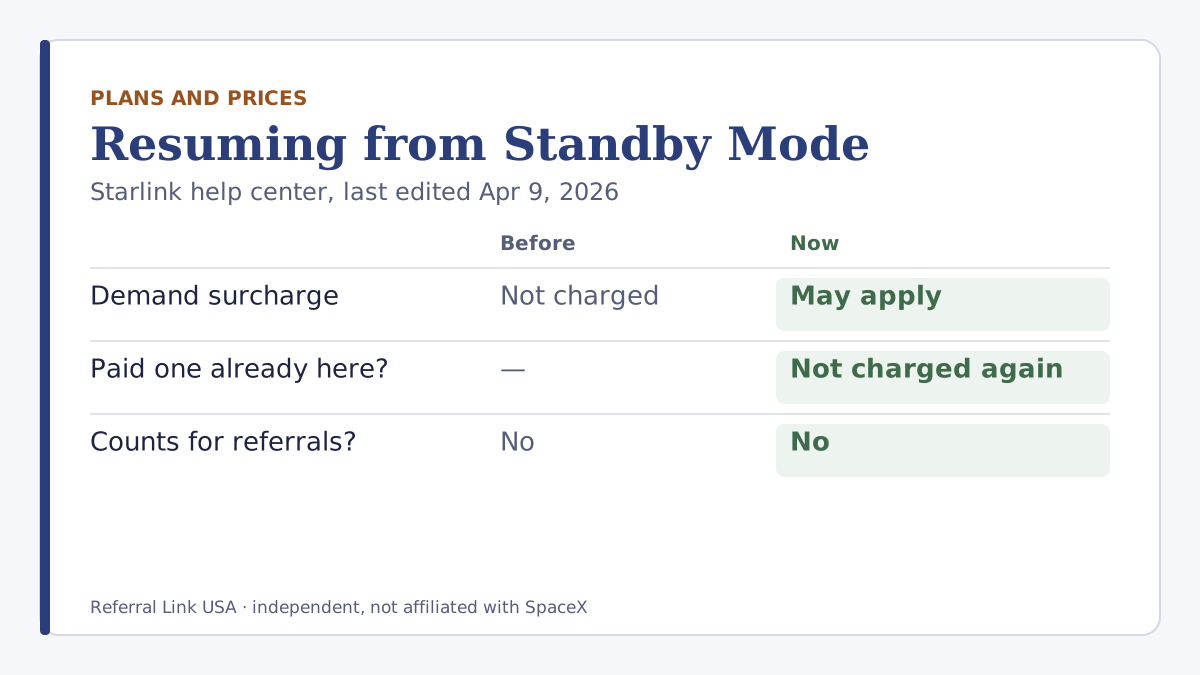
Starlink’s help article on demand surcharges, last edited Apr 9, 2026, now says: “Standby Mode does not remove or waive demand surcharges. It only preserves your previous eligibility for your service address.” If you already paid a surcharge at that address, you can pause and resume there without paying it again; if you never paid one, “one may apply when you resume high-speed service.”
RV Mobile Internet reported the change on Apr 9, 2026, saying the earlier wording promised no surcharge on resuming from Standby, and that the surcharge can reach up to $1,500 in some markets (a press figure; Starlink’s article gives no amount). The same help article also says a surcharge can apply when moving between service addresses.
When
The help article’s last-edited date is Apr 9, 2026, the same day as the press report. We read Starlink’s current text on Oct 6, 2026. This post is more than 90 days old and is kept as background.
Who is affected
Residential customers who pause with Standby Mode, especially those in areas with a demand surcharge, and anyone who moves their service address.
What it means for you
For referrers, Standby already had a cost: it doesn’t count as a high-speed plan, so if your only service line is on Standby, all your pending referrals are cancelled. A possible surcharge when you resume is one more reason to think twice before pausing.
Starlink’s own pages don’t yet agree. Its article on pausing, which carries the same Apr 9, 2026 edit date, still says you will not pay a demand surcharge when you pause and resume. The newer surcharge article is more specific, and the screen you see before confirming is what counts.
What to do now
Before pausing: let every pending referral mature first, and read the confirmation screen when you resume for any surcharge. If you never paid a surcharge at your address, assume one could apply.
What stays the same
Standby still doesn’t count toward the referral program, for you or for a friend you referred. The referral rules themselves are unchanged.
What we don’t know yet
Which areas carry a surcharge today and how much it is, and which of Starlink’s two help articles reflects current practice. We’ve seen no Starlink statement on the conflict.
How to check it yourself
In Starlink’s help center, open “What is a demand surcharge?” and read the section on Standby Mode, then open “How does pausing service work?” and compare the answer about resuming. When you resume service in the app or on starlink.com, the confirmation screen shows any charge before you approve it.