Starlink is open in your other tab. Look for this green box.
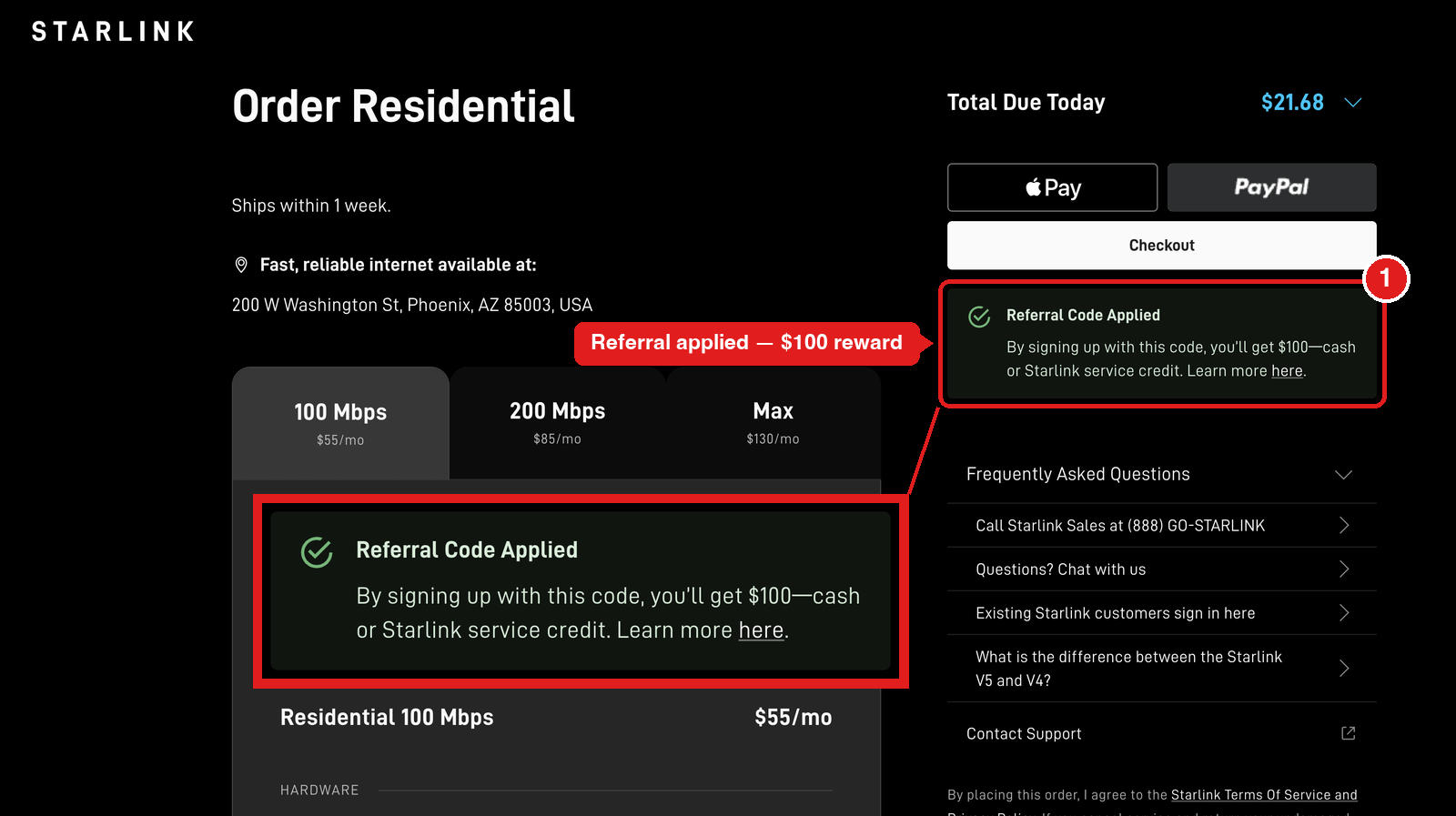
It sits under Checkout on Starlink’s order page when the referral came through:
Open starlink.com with the referral again US service addresses only
Disclosure (referral link): this button opens starlink.com with the site owner’s own Starlink referral link. If you order through it and the referral counts, the owner gets a referral reward too. Your price is the same whichever customer’s link you use. Independent, not affiliated with SpaceX. How this site makes money
If you just clicked a referral link on this site, starlink.com opened in a new tab and the referral went with it. Starlink’s home page won’t mention it; the green box only shows up later, on the order page.
Where the referral travels after your click
A referral link is an ordinary starlink.com address with one extra piece on the end: ?referral= followed by the sender’s code. That piece is the whole referral. Here is the path it takes.
- Tab 1 · this site
You click the link
This tab moves to this page so you have the checks to hand.
- Tab 2 · starlink.com
Starlink opens with the code
- Tab 2 · same browser
You pick a plan and address
Starlink carries the referral to the order page as you click through.
- Tab 2 · order page
The green box confirms it
Referral Code Applied
Why it has to be the same browser
The code exists only in the link and in the browser that opened it. Starlink doesn’t say how it remembers the code from page to page; in our run on it held from the plan page through to checkout in one browser tab. What it can’t do is jump: a second device, a different browser, or the in-app browser of a messaging app has never seen your click, so an order started there has no referral in it. The terms count only orders placed with the link: the new customer orders the kit using the referrer's own link; no other referral method counts.
From the starlink.com tab to the green box
Stay in the tab the link opened
Switch to the starlink.com tab rather than opening starlink.com fresh. Nothing on its home page mentions the referral, and that’s normal.
Choose a plan and enter your US service address
For Residential, Starlink asks for the address first and then shows the plans available there. Roam (travel and RV) asks only for the country.
Go on to the order page
This is the page with your plan, the kit price, the total due today and a Checkout button.
Look directly under Checkout
A green box should read
Referral Code Applied
, thenBy signing up with this code, you’ll get $100—cash or Starlink service credit. Learn more here.
That’s the confirmation. Finish the order in this same tab.
Don’t see it? Work through these before you pay
- Reopen the link in this browser. Close the starlink.com tab, use the button below, and build the order again in the tab it opens.
- Don’t switch device or app. A link tapped in a chat app opens in that app’s own browser; ordering later in Safari or Chrome starts without it. More on devices.
- Private windows and cookie blockers. A private window, strict tracking protection or a cookie-blocking extension may drop the referral between pages. Try a normal window with blockers paused for starlink.com.
- You’ve had Starlink before. The program is for people who have never been a subscriber; existing and past customers don’t qualify.
- You’re buying at a store. Kits from retailers, resellers or a transfer don’t qualify. The order has to be on starlink.com.
- You typed starlink.com by hand. A typed address has no
?referral=on it, so the order starts clean. Go back through the link.
Reopen the referral link US service addresses only
Disclosure (referral link): the site owner’s own referral link; if the referral counts, the owner is rewarded too. Same price for you.
What the $100 depends on
- Who
- New customers only: you has never been a Starlink subscriber
- Where
- A US service address, ordered on starlink.com (not a store)
- What
- $100, as account credit by default or cash where your account offers it
- When
- After you’ve stayed subscribed two billing cycles
You still pay the first month, the kit and any fee shown at checkout as normal; the referral is a reward afterwards, not money off today. Starlink sets the amount, can change the program, and decides each referral. The full rules are in how the referral program works, and how this site is paid is on how we make money.
Quick questions about the link
Do I need to type a referral code anywhere?
No. The code is already inside the link, and Starlink’s order page has no box for one. If the link was opened in the browser you’re ordering in, the order page says “Referral Code Applied” on its own.
Can I open the link on my phone and order on my laptop?
That’s the one move most likely to lose it. The laptop’s browser never saw the link, so its order starts without a referral. Open the link on the laptop itself, in the browser you’ll pay in.
Does the green box mean the $100 is guaranteed?
It means the link reached the order. The reward still depends on the rules: you’ve never had Starlink, you order on starlink.com for a US address, and you stay subscribed for two billing cycles. Starlink decides each referral, and its decision is final.
I closed the starlink.com tab. Have I lost the referral?
Not if you haven’t paid yet. Open the link again from this page, in the same browser, and build the order in the new tab. Just don’t type starlink.com into the address bar to get back.
Sources
- Starlink · Referral Program Terms (US), starlink.com legal document DOC-1882-84808-83 · dated Oct 7, 2026 · read Nov 16, 2026
- Starlink · Does Starlink have a referral program? (Starlink help center; metadata last edited Apr 9, 2026) · dated Apr 9, 2026 · read Nov 16, 2026
- Starlink · US Residential plan list (the data starlink.com loads with no address entered; one price tier, not a national price) · read Nov 16, 2026
- Starlink · "How do I use a referral link?" as written Dec 18, 2023 (Internet Archive copy captured Jun 11, 2025) · dated Dec 18, 2023 · read Oct 5, 2026